Module: Admin Application
Access to Admin Application
Access to the Admin App requires valid organizational credentials.
Users are granted role-based access to view, analyze, or manage communication data based on their team or department.
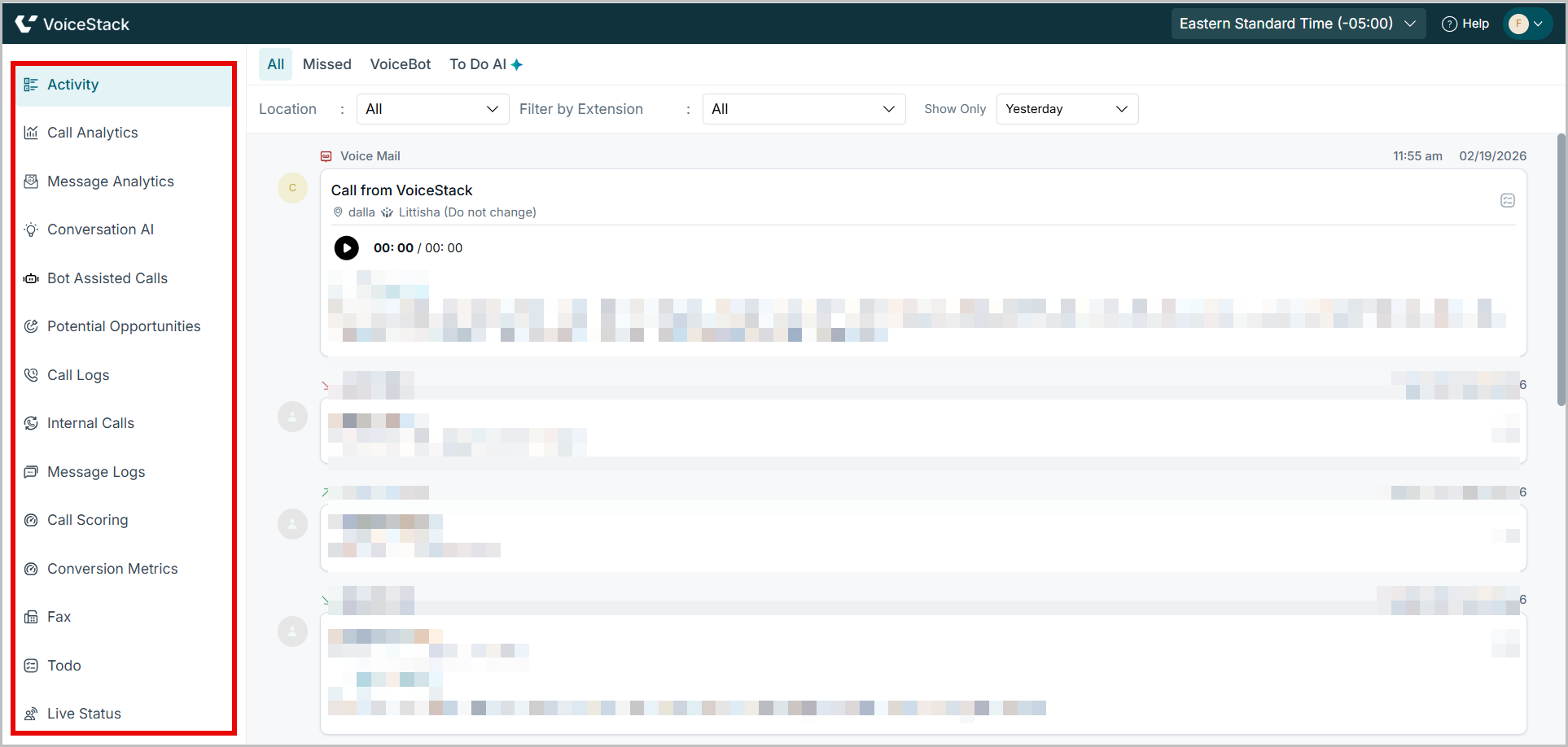
Overview of Navigation Pane
The navigation menu enables users to easily navigate between the core sections of the Admin App. Here's a brief overview of each tab:
1. Activity ?
The Activity module provides a chronological feed of all recent patient interactions—calls (inbound/ outbound/ missed), voicemails, and to-do items—enhanced with AI-generated summaries.
Key Elements:
- Call Types: Inbound, Outbound, Missed
- IQ Summary: AI-powered summary with patient concerns, intent, and call outcome
- Call Purpose and Outcome: Automatically tagged (e.g., New Appointment Booking, Patient Recall)
- Action Buttons: Follow-up options like “Send appointment confirmation message,” “Add anxiety note,” etc.
Best Practices:
- Use filters to prioritize calls requiring immediate action (e.g., “Pending Agent Action”).
- Review IQ summaries to reduce time spent listening to entire recordings.
- Use call purpose tags for weekly trend analysis on patient needs.
Benefits:
- Empowers agents to follow up with full context.
- Improves task resolution speed and accuracy.
- Reduces supervisor effort with AI-generated insights.
Use Case Example:
A patient calls to reschedule an appointment and expresses anxiety. The agent books a new date and adds an anxiety note, ensuring the care team is prepared. The system automatically logs this for visibility across departments.
2. Call Analytics ?
View visualized analytics of all inbound and outbound calls, including duration, volume, and agent-wise stats.
- Helps identify call trends and traffic peaks.
- Useful for performance monitoring and scheduling optimization.
- Best Practice: Review this daily to ensure consistent call handling efficiency.
Key Elements:
- Call volume trends
- Agent performance metrics
- Call duration heatmaps
Best Practices:
- Track high-volume hours to plan staffing.
- Monitor agent averages for productivity coaching.
Benefits:
- Optimizes workforce planning.
- Enhances call handling performance.
Use Case Example:
Noticing a call surge post-lunch, the admin adjusts agent shifts, reducing missed calls by 30%.
3. Message Analytics ?
Analyze message volume, response time, and keyword trends across text-based interactions.
- Offers insight into message responsiveness and missed engagement.
- Helps track bulk campaigns or recurring patient queries.
- Best Practice: Use filters to zero in on missed messages and patient sentiment patterns.
Key Elements:
- Text volume by channel
- Sentiment breakdown
- Common keywords and delays
Best Practices:
- Investigate negative sentiment spikes.
- Prioritize unanswered messages.
Benefits:
- Improves patient engagement quality.
- Speeds up message response workflows.
Use Case Example:
Keyword analysis reveals recurring billing confusion. FAQs are updated and agent scripts revised.
4. Conversation AI ?
Leverage AI to detect patient intents, emotions, and FAQs in calls/messages.
- Automates tagging of topics like appointment booking or complaints.
- Reveals training gaps by surfacing misunderstood queries.
- Best Practice: Review flagged conversations weekly to improve scripts and agent readiness.
Key Elements:
- Call intents
- Emotion detection
- Topic clustering
Best Practices:
- Use emotion scores to identify frustrated patients.
- Group topics to detect systemic issues.
Benefits:
- Sharpens training with real examples.
- Identifies experience bottlenecks.
Use Case Example:
Topic clustering highlights appointment confusion. A script and scheduling flow are restructured.
5. Potential Opportunities ?
AI identifies upsell or service opportunity moments from past conversations.
- Surfaces patients who may benefit from follow-ups.
- Flags unresolved requests that could lead to rebooking or service loss.
- Best Practice: Assign follow-up calls for every opportunity tagged to increase conversion.
Key Elements:
- Missed care/treatment suggestions
- Abandoned appointment leads
Best Practices:
- Follow up within 24 hours of flagged opportunities.
- Use opportunity tags to assign agents.
Benefits:
- Recovers lost revenue.
- Increases patient lifetime value.
Use Case Example:
A canceled implant consult is followed up within hours. The patient books again and treatment proceeds.
6. Call Logs ?
Chronological list of all calls with access to recordings and transcripts.
- Enables quick search and playback for QA or audits.
- Includes call duration, sentiment, and timestamps.
- Best Practice: Bookmark important calls and regularly tag them for coaching.
Key Elements:
- Audio recordings
- Full transcripts
- Call sentiment and classification
Best Practices:
- Spot-check logs weekly for QA.
- Use tags to search quickly.
Benefits:
- Ensures compliance.
- Supports dispute resolution.
Use Case Example:
A patient disputes advice given. Reviewing the log confirms the agent followed protocol correctly.
7. Internal Calls ?
View and track intra-office communication between staff.
- Promotes transparency and accountability in internal coordination.
- Helps assess teamwork and clarity in communication.
- Best Practice: Spot recurring internal call topics to streamline workflows.
Key Elements:
- Staff-to-staff call history
- Call notes
Best Practices:
- Review internal calls tied to escalations.
Benefits:
- Validates proper handover.
- Flag coordination gaps.
Use Case Example:
An agent misses a callback. The internal call shows it was escalated but not documented. Process updated.
8. Message Logs ?
Detailed archive of all message interactions, synced with timestamps.
- Supports audit trails and sentiment review.
- Helps assess tone and follow-up effectiveness.
- Best Practice: Use this for dispute resolution or patient clarification requests.
Key Elements:
- Full SMS message trails
- Timestamps
- Delivery status
Best Practices:
- Confirm delivery of time-sensitive alerts.
Benefits:
- Tracks communication transparency.
- Audits message quality.
Use Case Example:
A patient claims no reminder was received. Logs show it failed delivery; alternative workflows are created.
9. Call Scoring ?
Evaluate how well agents handled calls based on empathy, listening, and rapport.
- Includes auto and manual scores per agent.
- Enables performance coaching and tracking.
- Best Practice: Maintain a score calibration schedule for QA consistency.
Key Elements:
- Evaluation forms
- Score by dimension (e.g., tone, clarity, empathy)
Best Practices:
- Calibrate with examples during calibration sessions.
- Score random samples weekly.
Benefits:
- Drives consistent service quality.
- Helps identify coaching needs.
Use Case Example:
Low empathy scores prompt training. Afterward, scores improve by 20%.
10. Fax ?
Monitor sent and received faxes with timestamps and status.
- Useful for practices that still rely on fax-based documentation.
- Includes retry options for failed faxes.
- Best Practice: Regularly archive critical patient communications.
Key Elements:
- Sent/received fax records
- Delivery status
Best Practices:
- Check status daily for urgent faxes.
Benefits:
- Tracks legal/treatment-related communication.
Use Case Example:
A referral is faxed. Status shows it failed. Resent the same day, avoiding delay.
11. Todo ?
Assign and track internal tasks related to call outcomes or patient needs.
- Keeps staff accountable for follow-ups and pending actions.
- Includes deadlines and status filters.
- Best Practice: Review completed tasks weekly to ensure closure of all action items.
Key Elements:
- Follow-up action items
- Due dates and status
Best Practices:
- Check daily.
- Use notes to avoid context loss.
Benefits:
- Prevents dropped patient tasks.
- Keeps agent accountability.
Use Case Example:
An agent marks a task as done but no call is logged. Task audit corrects oversight.
12. Live Status ?
Real-time dashboard of ongoing calls, agent availability, and live interactions.
- Helps supervisors manage call queues and shift allocation.
- Supports live interventions if needed.
- Best Practice: Monitor during peak hours for timely support to agents.
Key Elements:
- Real-time call activity
- Agent availability
Best Practices:
- Monitor during peak hours.
Benefits:
- Immediate call to the floor supervisor.
Use Case Example:
Supervisor sees 4 agents idle during rush. Promptly reassigns calls to reduce wait times.
13. Configuration ?
Set up users, roles, call tags, and scoring parameters.
- Offers granular control over access, workflows, and automation settings.
- Essential for onboarding new agents and refining quality guidelines.
- Best Practice: Periodically audit roles and tag configurations for relevance and security.
Key Elements:
- Role management
- Custom tags and scoring criteria
Best Practices:
- Periodically review permissions.
Benefits:
- Maintains platform integrity.
- Enables tailored workflows.
Use Case Example:
A new department is added. Admin sets tags and roles specific to their needs.
Was this article helpful?
That’s Great!
Thank you for your feedback
Sorry! We couldn't be helpful
Thank you for your feedback
Feedback sent
We appreciate your effort and will try to fix the article